Let me paint you a familiar picture. It's the last day of the month. Your CFO pings you on Slack. The AWS bill is - again - way over budget. You know there's waste in there somewhere. You just don't know where.
Here's the hard truth: you're not alone. Global cloud spend is projected to smash past $700 billion in 2026, and an estimated 20–35% of that is just... wasted - sitting on idle instances, forgotten snapshots, and massively over-provisioned EC2s running at 8% CPU utilization. As a CTO or engineering leader, that number should make your stomach turn. That's not infrastructure investment. That's a money leak dressed up in a "scalability" costume.
This guide is your complete playbook to fix it - practically, methodically, and without sacrificing performance.
What Is Cloud Cost Optimization (And Why Should You Care in 2026)?
Cloud cost optimization is the process of reducing your cloud spend while maintaining - or even improving - performance. It means eliminating waste, picking the right pricing models, and making your infrastructure scale smart instead of just scaling big.
But here's what makes 2026 different: the stakes are higher. AI workloads are adding GPU costs to already bloated bills. Multi-cloud sprawl is the new normal. And FinOps - once a niche discipline - is now a C-suite priority. If you're still treating AWS cost management like a quarterly afterthought, you're leaving real money on the table. Every sprint.
The 80/20 of AWS Cost Waste: Where the Money Actually Goes
Before you can cut costs, you need to know what you're cutting. Here's where most AWS bills hide their ugly secrets:
- Over-provisioned EC2 instances - it's common to find 60–70% oversizing across compute fleets
- Idle RDS databases spinning 24/7 for dev environments nobody's used in weeks
- Unattached EBS volumes quietly accruing charges after instances are terminated
- NAT Gateway egress fees nobody thought to optimize at architecture time
- Forgotten S3 data stored in Standard tier when Glacier would cost 90% less
Think of it like auditing your company's expenses after a period of rapid growth. Every line item made sense at the time. But now? Half of them are zombie subscriptions. Cloud waste works the same way.
Step 1: Get Visibility First - Build Your Cloud Cost Dashboard
You can't optimize what you can't see. The first thing I always recommend to engineering teams is to stop flying blind.
AWS Cost Explorer is your starting point. It's free, it's native, and it gives you a serviceable breakdown of where spend is going. But if you're managing multi-team environments or running Kubernetes workloads, you'll quickly outgrow it.
A solid cloud cost tagging strategy is non-negotiable. Tag every resource by team or squad, environment (prod, staging, dev), project or cost-center, and owner. Without tags, you're reading a receipt with no line items. And yes, enforcing tagging compliance before resources are provisioned is possible - more on that in the Terraform section below.
Recommended Dashboard Stack
| Tool | Best For | Cost |
|---|
| AWS Cost Explorer | Native AWS visibility | Free |
| CloudZero | Anomaly detection + unit economics | Paid |
| Vantage | Engineer-friendly cost UI | Freemium |
| Finout | Multi-cloud + Kubernetes | Paid |
| Kubecost | Kubernetes namespace/pod-level cost | Freemium |
Step 2: Right-Size Everything (Yes, Everything)
Right-sizing is the single highest-ROI action most teams never fully execute. It means adjusting your compute, memory, and storage to match actual usage patterns - not theoretical peaks from 18 months ago.
Here's the approach that works: pull 30–90 days of CPU, memory, and network metrics per instance. Use AWS Compute Optimizer to get ML-powered resize recommendations. Downsize in stages - don't drop from m5.4xlarge to t3.medium in one shot. Split mixed workloads so you can right-size each independently. Set SLO-driven autoscaling thresholds so you don't over-provision "just in case" again.
A real-world example: one team documented had latency drop from 190ms to 60ms after right-sizing and switching to Graviton-based instances. Performance went up. Costs went down. That's the right-sizing double win.
Step 3: Master the Pricing Models - Reserved vs. Spot vs. Savings Plans
This is where engineering leaders often get confused. Let's break it down cleanly.
Reserved Instances vs. Savings Plans vs. Spot Instances
| Pricing Model | Max Discount | Best For | Commitment |
|---|
| Standard Reserved Instances | Up to 75% | Stable, predictable workloads | 1–3 year, specific config |
| EC2 Instance Savings Plans | Up to 72% | Flexible compute across families | 1–3 year, $/hour spend |
| Compute Savings Plans | Up to 66% | Cross-region, cross-OS flexibility | 1–3 year |
| Spot Instances | Up to 90% | Batch jobs, CI/CD, fault-tolerant apps | None - interruptible |
The FinOps rule of thumb that works in practice: cover 60–70% of your baseline with Reserved Instances or Savings Plans, and run the rest on-demand or Spot. Don't over-commit. Commitments you can't fill are just expensive mistakes in slow motion.
Use Savings Plans when you need flexibility across instance families and want to avoid being locked to a specific configuration. Use Standard RIs when your workload is highly predictable and you're confident in the exact instance type and region for 1–3 years. And Spot Instances? Brilliant for CI/CD pipelines, batch processing, data pipelines, and ML training jobs. With Spot Fleet diversification across instance types, interruptions can be kept below 5%.
# Example: Launch a Spot Fleet with diversification
aws ec2 request-spot-fleet --spot-fleet-request-config '{
  "IamFleetRole": "arn:aws:iam::123456789012:role/spot-fleet-role",
  "AllocationStrategy": "diversified",
  "TargetCapacity": 10,
  "SpotPrice": "0.05",
  "LaunchSpecifications": [
    {"InstanceType": "m5.large", "ImageId": "ami-0abcdef1234567890"},
    {"InstanceType": "m4.large", "ImageId": "ami-0abcdef1234567890"},
    {"InstanceType": "m5a.large", "ImageId": "ami-0abcdef1234567890"}
  ]
}'
Step 4: Kubernetes Cost Optimization
If you're running EKS, this section is going to save you a lot. Kubernetes is powerful, but left unmanaged it becomes one of the most efficient ways to burn cloud budget.
The Kubernetes Cost Optimization Checklist
Right-size pod requests based on P95 historical usage, not peaks Implement Cluster Autoscaler or Karpenter for node-level scaling Use Vertical Pod Autoscaler (VPA) for automated resource request recommendations Eliminate zombie workloads and unused namespaces Use Kubecost to track cost per namespace, deployment, and team Move fault-tolerant workloads to Spot node groups (up to 90% savings) Consider Graviton/AMD instance families for better price-performance ratio Reduce log and metric cardinality - high cardinality silently drives infra cost # Example: Karpenter NodePool for Spot + On-Demand mix
apiVersion: karpenter.sh/v1alpha5
kind: Provisioner
metadata:
name: default
spec:
requirements:
- key: "karpenter.sh/capacity-type"
operator: In
values: ["spot", "on-demand"]
- key: "kubernetes.io/arch"
operator: In
values: ["arm64"] # Graviton for cost savings
limits:
resources:
cpu: 1000
provider:
instanceProfile: KarpenterNodeInstanceProfile
subnetSelector:
karpenter.sh/discovery: my-cluster
securityGroupSelector:
karpenter.sh/discovery: my-cluster
Step 5: Enforce Cost Governance at Provisioning Time with Terraform + Infracost
Here's a concept that fundamentally changes the cost conversation: shift cost left. Instead of reviewing your AWS bill at the end of the month, surface cost estimates before code is merged. Tools like Infracost integrate directly into your CI/CD pipeline and estimate the monthly cost of infrastructure changes before deployment.
# Install Infracost and run cost estimate in CI
npm install -g infracost
infracost breakdown --path ./terraform
# Output example:
# aws_instance.web_server  m5.xlarge  $140.16/mo
# aws_db_instance.main     db.r5.large $182.50/mo
# Monthly total: $322.66
You can also use Open Policy Agent (OPA) with Terraform to reject non-compliant resources - like instances without required tags, or oversized instance types provisioned in dev environments.
# Terraform: enforce tagging policy via locals and validation
variable "required_tags" {
  type = map(string)
  validation {
    condition     = contains(keys(var.required_tags), "team") && contains(keys(var.required_tags), "environment")
    error_message = "Resources must include 'team' and 'environment' tags."
  }
}
This is Infrastructure as Code doing what it should: making cost a first-class concern, not an afterthought.
Step 6: Implement FinOps - It's a Culture, Not a Tool
FinOps (Cloud Financial Operations) is the operational framework that brings engineering, finance, and business together to manage cloud spend efficiently. And in 2026, AWS itself has leaned in - at re:Invent 2025, AWS announced new Cost Efficiency Metrics, AI-powered FinOps capabilities via Amazon Q, and Compute Optimizer Automation.
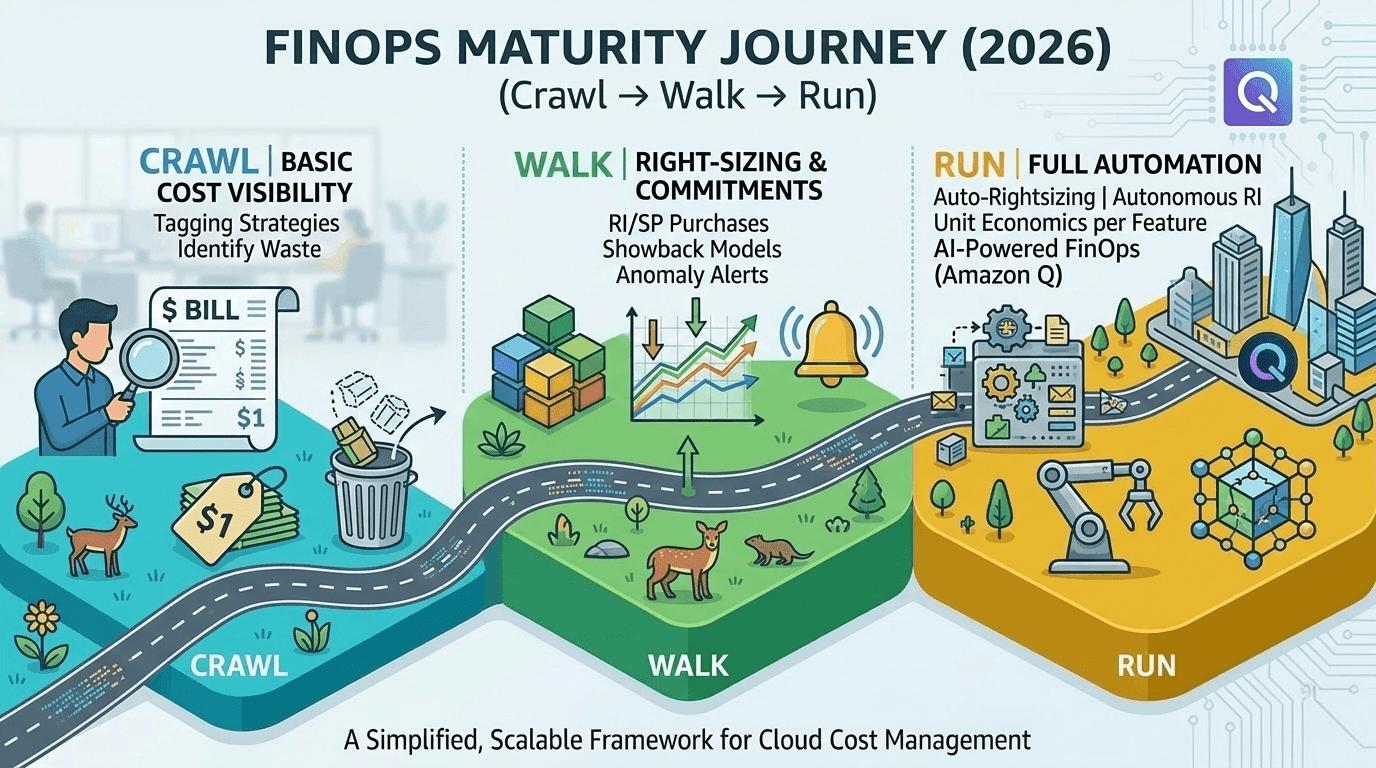
The FinOps Maturity Model works in three phases: Crawl - Basic cost visibility, tagging, and identifying the biggest waste areas. Walk - Right-sizing, RI/SP commitments, showback/chargeback models, anomaly alerts. Run - Full automation: auto-rightsizing, autonomous commitment management, unit economics per feature.
Showback vs. Chargeback: Which Model Is Right for You?
Showback makes teams aware of their cloud costs. Chargeback actually bills teams internally for their usage. Both drive accountability.
| Model | How It Works | Best For |
|---|
| Showback | Teams see their spend, no internal billing | Early FinOps maturity, culture building |
| Chargeback | Teams are billed via internal transfer pricing | Mature orgs, large engineering departments |
Start with showback to build the culture. Graduate to chargeback once teams understand their cost drivers.
Step 7: Detect Cost Anomalies Before They Explode
A runaway Lambda function. A misconfigured data transfer route. A developer who accidentally left a GPU instance running over a long weekend. Cost anomalies are everywhere, and they happen fast.
AI-based anomaly detection tools like CloudZero, Vantage, and Finout alert you in real-time when spend deviates from expected patterns. AWS also has native anomaly detection in Cost Explorer - enable it, set thresholds, and connect it to SNS for Slack/email alerts.
# Python: Trigger SNS alert when AWS spend anomaly detected
import boto3
ce = boto3.client('ce')
sns = boto3.client('sns')
response = ce.get_anomalies(
    DateInterval={'StartDate': '2026-03-01', 'EndDate': '2026-03-10'},
    TotalImpact={'NumericOperator': 'GREATER_THAN', 'StartValue': 500}
)
for anomaly in response['Anomalies']:
    spend = anomaly['TotalImpact']['TotalActualSpend']
    sns.publish(
        TopicArn='arn:aws:sns:us-east-1:123456789:cost-alerts',
        Message="Cost anomaly detected! Impact: $%.2f" % spend,
        Subject='AWS Cost Anomaly Alert'
    )
Step 8: Optimize Serverless and Storage (The Silent Budget Killers)
Two areas that don't get enough love in cost optimization conversations.
Lambda / Serverless: Right-size memory allocation - Lambda pricing is linear to memory, and over-allocating is common. Use AWS Lambda Power Tuning to find the optimal memory/performance/cost configuration. Enable function URL caching where appropriate. Review invocation patterns - are you paying for thousands of cold starts unnecessarily?
S3 and Storage: Enable S3 Intelligent-Tiering for objects with unpredictable access patterns. Set lifecycle policies to auto-transition objects to Glacier after 90 days. Delete incomplete multipart uploads - they silently accumulate. Use VPC Endpoints for S3 and DynamoDB to eliminate NAT Gateway per-GB charges.
The Ultimate AWS Cost Optimization Checklist for 2026
Keep this pinned. Run through it quarterly.
Visibility & Governance
Tagging strategy enforced across all accounts AWS Cost Explorer enabled with budget alerts Anomaly detection configured and connected to alerting Infracost integrated into CI/CD pipeline Compute
EC2 instances right-sized using Compute Optimizer Auto Scaling Groups configured with demand-based policies 60–70% of baseline covered by Savings Plans or Reserved Instances Spot Instances used for all fault-tolerant workloads Kubernetes
Kubecost deployed for pod/namespace visibility VPA and Cluster Autoscaler / Karpenter active Spot node groups in use for batch/dev workloads Zombie namespaces and unused deployments cleaned up Storage & Networking
S3 lifecycle policies set for all buckets Intelligent-Tiering enabled where appropriate VPC Endpoints created for S3, DynamoDB, CloudWatch, ECR Unattached EBS volumes identified and removed FinOps Culture
Showback/chargeback model implemented Monthly FinOps review with engineering + finance Unit economics tracked per feature or product line Frequently Asked Questions
Do I need a third-party tool if I already use AWS Cost Explorer?
Native tools like AWS Cost Explorer are great for basics, but they won't give you Kubernetes pod-level visibility, multi-cloud support, custom anomaly detection, or FinOps automation. For most teams beyond the startup phase, a third-party platform delivers materially better outcomes.
Can cost optimization tools actually save money automatically?
Yes - modern platforms can auto-shut down idle resources, auto-rightsize instances, and autonomously manage your RI/Savings Plans portfolio. Teams typically see 20–30%+ savings from automation alone.
What's the fastest single action I can take today?
Run AWS Compute Optimizer on your EC2 fleet and implement the top right-sizing recommendations. Most teams find at least 20% of compute spend can be eliminated in the first pass.
The Bottom Line
Cutting AWS costs in 2026 isn't about being cheap. It's about being precise. Every dollar you reclaim from cloud waste is a dollar you can reinvest into the features, engineers, and infrastructure that actually move your business forward.
The teams winning at cloud cost management aren't doing something exotic. They have visibility, they've built a FinOps culture, they've automated what can be automated, and they treat cost as a first-class engineering concern - not a finance problem.
Start with the checklist above. Pick the two or three items you know you're not doing today. Build the habit. And keep iterating - because the cloud never stops changing, and neither should your cost strategy.
Have a specific AWS cost challenge you're wrestling with - Kubernetes, multi-account sprawl, or commitment strategy? Drop it in the comments. I read every one.